8 Best VIRTUAL TRY-ON solutions for Brands and Retailers
Compare the best footwear virtual try-on solutions for brands, retailers, e-commerce teams, and digital innovation leaders
-
footwear realism
-
web integration and mobile performance
-
3d assets workflow
-
catalog scalability
In a nutshell tl;dr
The best footwear virtual try-on solution depends on your catalog, product content workflow, e-commerce setup, and deployment needs.
- Best overall footwear-specific option to evaluate first: Fittingbox Footwear, especially for scalable 3D expertise and B2B deployment
- Best for AI-generated 3D-from-photo workflows: Wearfits and Artlabs
- Best established footwear AR specialists: Vyking and Wanna
- Best for 3D product content plus try-on: Fibbl
- Best for customizable commerce stacks: Zakeke
- Best for basic AR shoe try-on: Kixr
get to know
what is a footwear virtual try-on solution?
A footwear virtual try-on solution lets shoppers preview shoes on their feet using a camera, photo, augmented reality, and 3D assets. These experiences are usually embedded inside a product detail page, mobile web flow, app, campaign experience, or retail environment.
Why footwear brands Invest in virtual try-on
Footwear virtual try-on helps brands and retailers connect visual confidence with e-commerce, product content, and omnichannel outcomes. Instead of relying only on flat product images, shoppers can better understand how a shoe looks on foot before moving closer to purchase.
Benefit |
Why it matters |
|---|---|
| Confidence | Helps shoppers picture the shoe on foot before checkout |
| Conversion | Increases interaction on product detail pages and digital campaigns |
| Returns | Reduces avoidable uncertainty before purchase providing a positive ecological and economic impact |
| Catalog discovery | Makes large collections easier to explore |
| Product content | Allows 3D assets to be reused across PDPs, AR, and marketing |
| Omnichannel | Supports web, mobile, and assisted retail experiences |
Quick comparison: Best Footwear virtual try-on solutions
Use this quick comparison to identify which footwear virtual try-on providers best match for your business needs:
Solution |
Best for |
Key Strength |
|---|---|---|
| Fittingbox Footwear | Footwear brands and e-retailers | Footwear-specific 3D expertise |
| Wearfits | Fast 3D-from-photo try-on | Automated asset creation |
| Vyking | Fashion AR and sizing use cases | Footwear AR experience depth |
| Wanna | Enterprise AR commerce | Broad fashion try-on suite |
| Fibbl | 3D product content at scale | Reusable true-to-life assets |
| Zakeke | Customizable products | Commerce integrations |
| Artlabs | AI shoe virtual try-on and analytics | Fast product detail page try-on workflow |
| Kixr | Basic AR shoe try-on | Entry-level visualization accross web and mobile |
how we evaluated the footwear virtual try-on solutions
We compared each provider based on public provider information and footwear-specific buying criteria for brands, retailers, e-commerce teams, and omnichannel businesses.
Footwear Specialization
What we looked at:
Whether the solution is directly relevant to shoe try-on, footwear visualization, and footwear e-commerce use cases.
Realism and foot tracking
What we looked at:
How well the solution appears to support shoe-on-foot visualziation, scale, movement, pose, and occlusion.
3D shoe asset quality
What we looked at:
Quality, scalability, and workflow for creation or managing digital shoe models.
Catalog availability
What we looked at:
Whether the solution can support multiple SKUs, colorways, product variants, and large catalogs
Website implementation
What we looked at:
Compatability with product detail pages, e-commerce websites, CMS environments, apps, APIs, or SDKs.
Mobile performance
What we looked at:
Whether the experience appears suited to mobile-first shopping journeys.
Support and data privacy
What we looked at:
Implementation support, analytics, and data handling considerations.
Business fit
What we looked at:
Relevance for footwear brands, retailers, e-commerce teams, and omnichannel deployments.
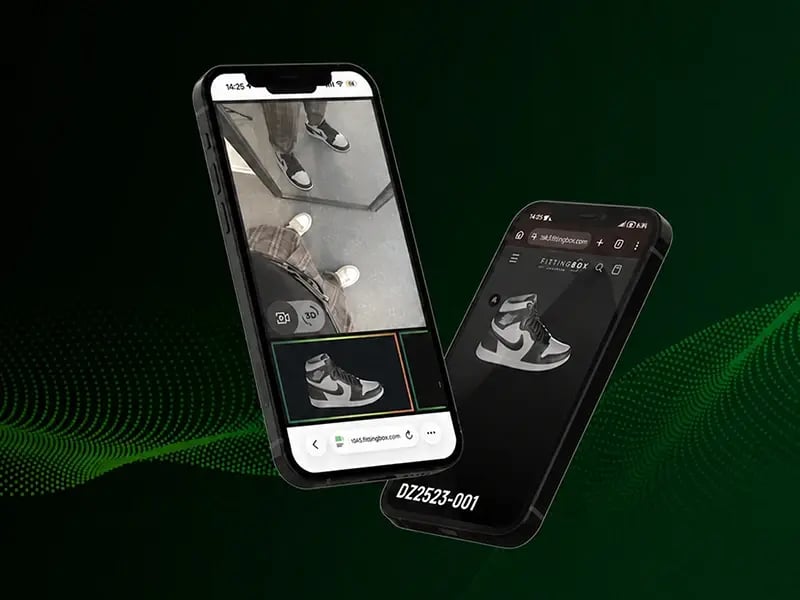
Best footwear-specific virtual try-on solution
#1 Fittingbox Footwear
Fittingbox Footwear is a B2B virtual try-on and 3D expertise solution for footwear brands that need realistic try-on, scalable assets, and reliable deployment across online shopping journeys.
It is especially relevant for brands and e-retailers looking for a footwear-specific partner rather than a generic AR layer.
Key features:
- Footwear virtual try-on experience
- 3D expertise and digitization know-how
- Web and mobile e-commerce use cases
- Scalable asset workflow
- B2B support and deployment
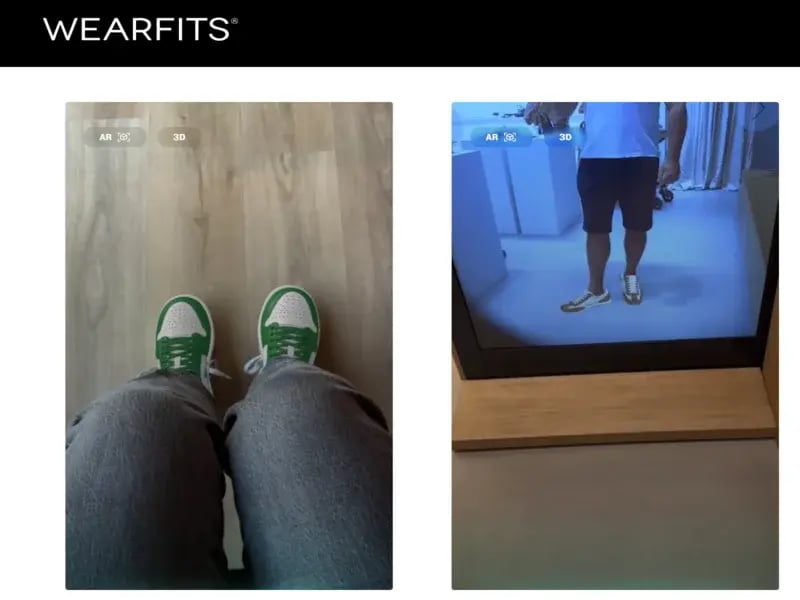
Best for AI-generated 3D assets
#2 Wearfits
Wearfits positions itself around instant, photorealistic virtual try-on for shoes and bags, with AI-powered 3D-from-photo asset creation across web, mobile, and retail contexts.
Key features:
- Footwear and bags virtual try-on
- AI 3D generation from photos
- Web and mobile experience
- Sizing and fit messaging
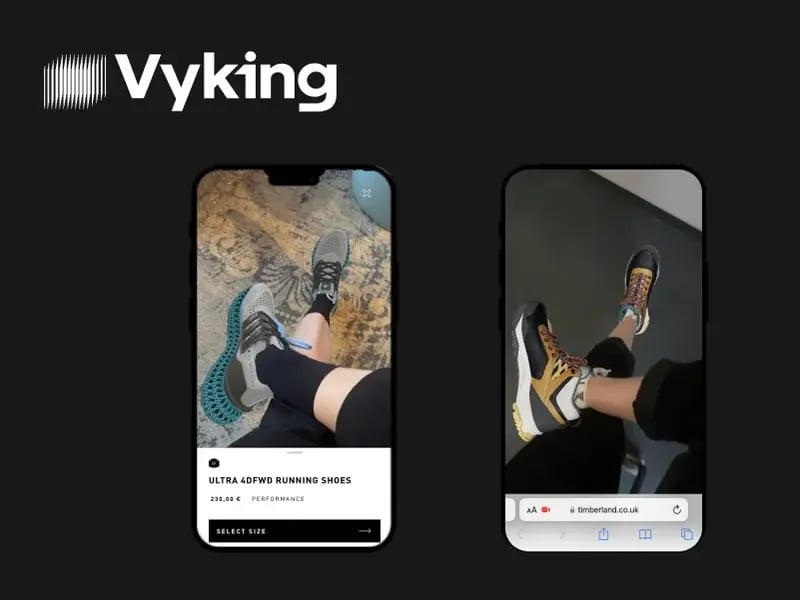
Best for fashion accessories and footwear AR
#3 Vyking
Vyking combines AI, 3D, and AR for fashion visualization, virtual try-on, sizing, and product experiences, with an established focus on fashion accessories.
Key features:
- Footwear AR try-on
- 3D visualization
- Sizing-oriented use cases
- App and cross-platform experiences
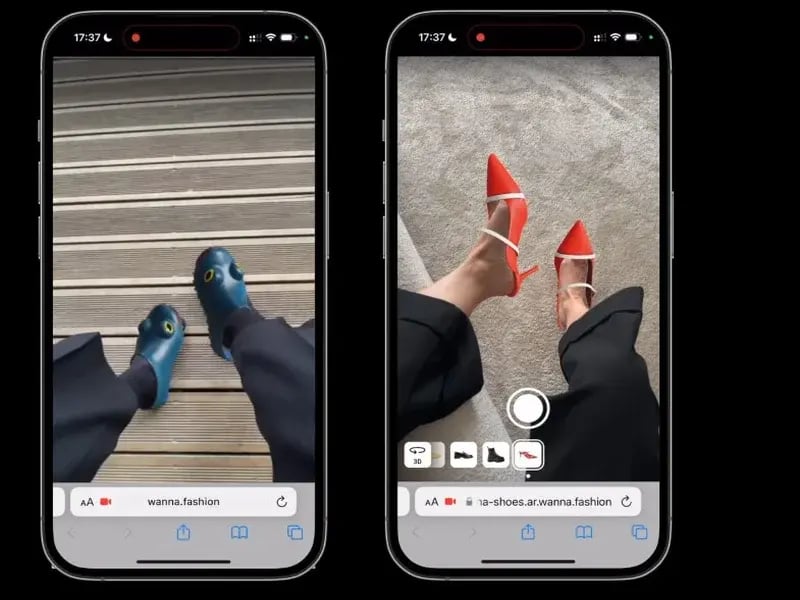
Best for enterprise AR commerce
#4 Wanna
Wanna offers AR and 3D virtual try-on for fashion categories including sneakers, boots, loafers, sandals, and high-heeled shoes.
Key features:
- Footwear AR try-on
- 3D viewers
- Enterprise commerce suite
- Fashion category breadth
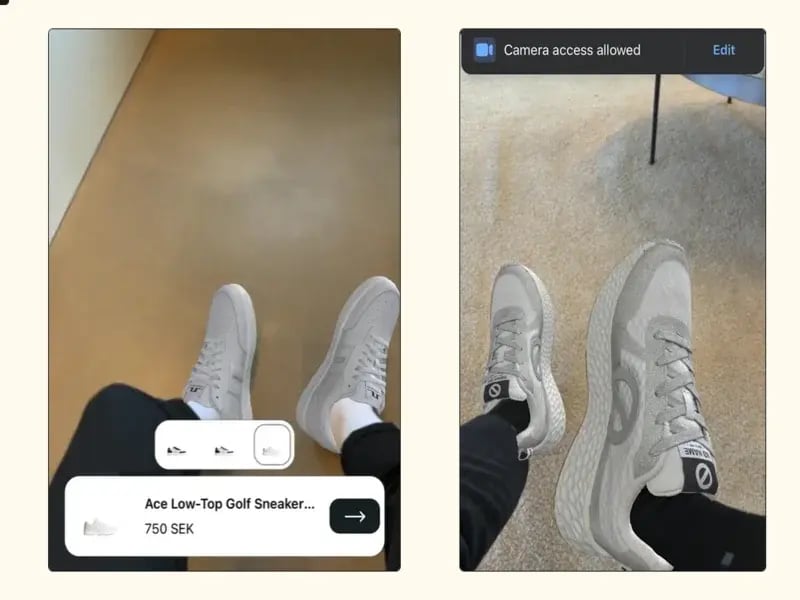
Best for 3D content reuse
#5 Fibbl
Fibbl focuses on high-quality 3D product visualization for footwear, with experiences such as 3D viewer, AR, and virtual try-on created from reusable 3D assets.
Key features:
- Footwear 3D assets
- 3D viewer, AR, and VIRTUAL TRY-ON
- Product content repurposing
- Marketing asset reuse
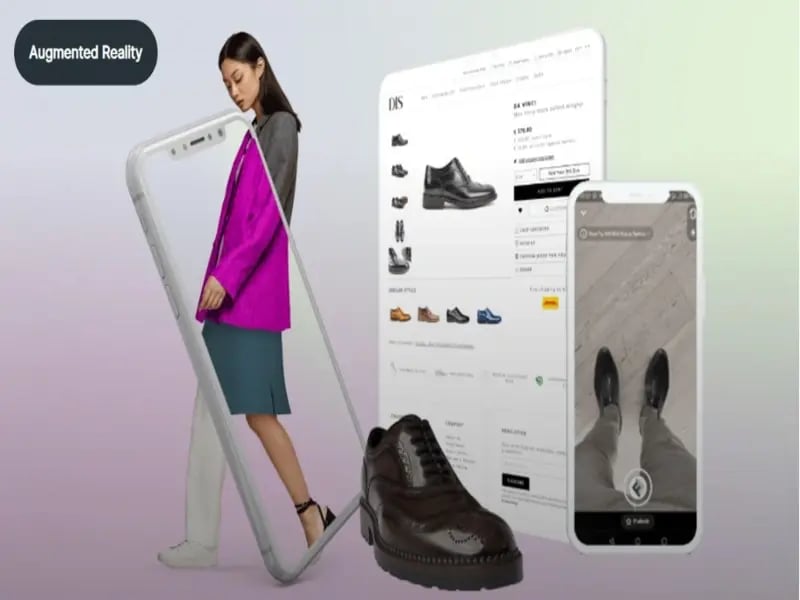
Best for customizable commerce
#6 Zakeke
Zakeke offers virtual try-on as part of a broader commerce platform that includes product customization, 3D configuration, AR, and AI visual production.
Key features:
- Virtual try-on for footwear and other categories
- Customizable and configurable products
- 3D model-based workflows
- E-commerce platform ecosystem
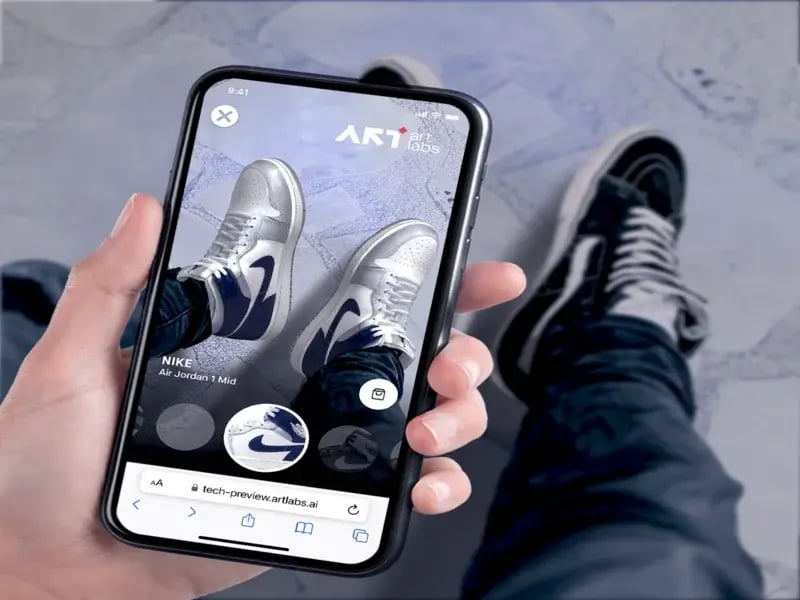
Best for AI shoe virtual try-on and analytics
#7 Artlabs
Artlabs positions itself as an AI-powered immersive 3D commerce platform for shoe virtual try-on, emphasizing fast product-detail-page deployment and analytics.
Key features:
- Shoe virtual try-on
- AI-assisted 3D workflows
- PDP-first deployment
- Analytics and ROI mesaging
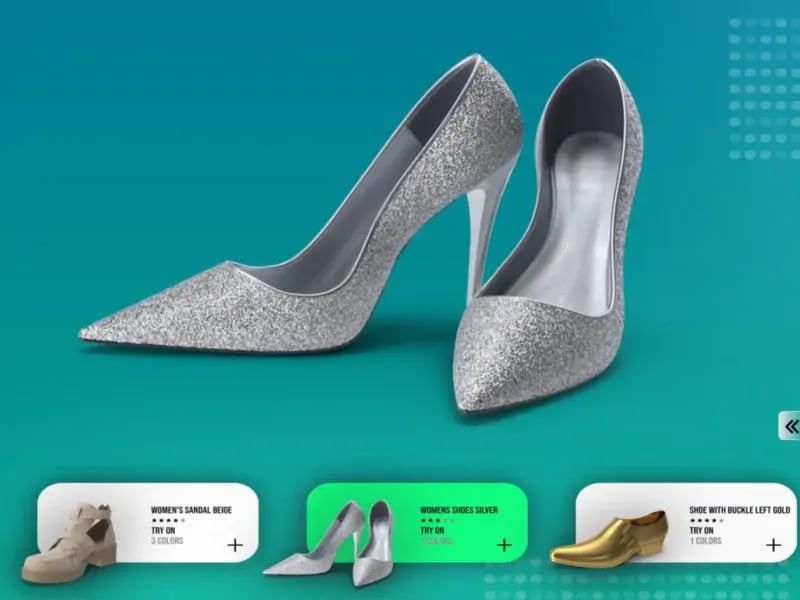
Best for basic custom virtual try-on
#8 Kixr
Kixr offers AR shoe virtual try-on and 3D footwear visualization across web, mobile web, iOS, and Android. It is relevant as an entry-level AR footwear option,but its public demos and visual quality appear more basic compared with more advanced providers.
Key features:
- AR shoe try-on
- 3D shoe assets
- 360-degree product view
- Web and mobile integration
Full comparison of footwear virtual try-on solutions
Use this table to compare each solution by footwear focus, website virtual try-on availability, 3D asset workflow, and overall business fit:
| Solution | Footwear focus | Web virtual try-on | 3D assets | Best for |
|---|---|---|---|---|
| Fittingbox Footwear | High | Realism and quality of service | ||
| Wearfits | High | AI-generated | Fast asset creation | |
| Vyking | High | Sizing and fashion AR use cases | ||
| Wanna | High | Enterprise-level AR commerce | ||
| Fibbl | High | 3D content reuse | ||
| Zakeke | Medium | Depends | Customization stack | |
| Artlabs | High | AI-assisted | Light solution with analytics | |
| Kixr | Low | Basic | Simple 3D visualization |
How to choose the right footwear virtual try-on solution
The right footwear virtual try-on solution depends on your business model, catalog size, e-commerce setup, product content process, and deployment goals.
Before choosing a provider, define whether your priority is product detail page engagement, campaign activation, in-store retail, omnichannel deployment, 3D asset scalability, or a custom AR experience.
Use case
Why it matters:
Decide whether you need product detail page virtual try-on, campaign try-on, in-store usage, or omnichannel deployment
Footwear realism
Why it matters:
Check foot tracking, occlusion, shoe scale, pose, texture, shadows, and sole visibility
3D shoe asset creation
Why it matters:
Large catalogs need a reliable process for creating, updating, and managing 3D shoe models
Catalog scalability
What we looked at:
Make sure SKUs, sizes, colorways, variants, and product updates can be managed efficiently
Integration options
Why it matters:
Check compatibility with your CMS, app, no-code setup, API, SDK, analytics, and retail tools
Mobile performance
Why it matters:
Footwear virtual try-on must work smoothly on mobile product pages and mobile-first shopping journeys
Ownership and costs
Why it matters:
Clarify asset ownership, maintenance, rollout timeline, and total cost before launch
Support and analytics
Why it matters:
Review implementation support, tracking, optimization, and post-launch guidance
Common mistakes when choosing footwear virtual try-on software
Choosing a virtual try-on provider is not only about adding an AR button to a product page. For footwear brands and retailers, the wrong setup can create poor realism, difficult asset workflows, slow mobile performance, or a try-on experience that does not scale.
Choosing generic AR without footwear validation
Make sure the solution can handle footwear-specific requirements such as foot pose, shoe scale, occlusion, material texture, and mobile performance.
Underestimating shoe geometry and occlusion
Review how the shoe appears around the foot, ankle, sole, and floor contact areas. The experience should look natural, not simply placed on top of the camera view.
Treating 3D asset creation as a one-time task
Check how 3D assets are created, updated, reused, and maintained as new products and colorways are added.
Checking performance only on desktop
Test the experience on mobile devices, since many footwear shoppers discover and compare products on smartphones.
Forgetting catalog operations and colorways
Make sure the provider can support SKUs, colorways, variants, product updates, and large footwear collections.
Ignoring analytics, support, and post-launch optimization
Look for implementation support, usage tracking, performance monitoring, and guidance after launch.
Why footwear-specific virtual try-on technology matters
Footwear virtual try-on has different requirements from general AR try-on. Shoes need to appear naturally on or around the foot, match the right scale, follow foot movement, handle occlusion, and show materials, shadows, textures, soles, and proportions accurately.
Match your footwear challenge with the right solution requirement
Different footwear businesses need virtual try-on for different reasons. Some teams want to increase product page engagement, while others need scalable 3D assets, mobile-first deployment, omnichannel support, or better measurement of digital performance
| Business challenge | What to look for | Fittingbox relevance |
|---|---|---|
| Low confidence online | Realistic shoe-on-foot preview | Footwear virtual try-on demo |
| Large shoe catalog | Scalable 3D workflow | 3D expertise and digitization |
| Material or texture doubts | High-quality 3D assets | Asset quality process |
| Mobile product detail page friction | Fast web deployment | Web and mobile virtual try-on |
| Omnichannel needs | Reusable assets and UX | B2B deployment support |
| Hard to measure ROI | Analytics and texting plan | Demo and tracking setup |
Unlock the power of footwear virtual try-on
Ready to make footwear more visual?
Leave your details for a guided walkthrough of Fittingbox Shoes Try-On.
Frequently Asked Questions
What is the best footwear virtual try-on solution for brands?
The best solution depends on your business model, catalog size, and deployment needs. Footwear brands should prioritize realism, 3D asset quality, web integration, mobile performance, scalability, analytics, and footwear-specific expertise. Based on the criteria, Fittingbox Footwear stands out as the best overall footwear-specific solution to evaluate first.
How does footwear virtual try-on work?
Footwear virtual try-on uses a camera, photo, AR technology, and 3D shoe assets to let shoppers preview shoes on or near their feet before buying. The experience can be embedded on product pages, mobile web flows, apps, or retail tools.
Can shoppers try shoes online without an app?
Yes ! Many footwear virtual try-on solutions can work directly on e-commerce websites or mobile web experiences without requiring shoppers to downaload an app.
Do footwear brands need 3D shoe models?
In most professional use cases, yes. 3D shoe models help create more realistic product visualization and can also be reused across product pages, AR, 3D viewers, and marketing content.
How accurate is shoe virtual try-on?
Shoe virtual try-on can provide a realistic visual preview when supported by strong 3D assets, foot tracking, scale handling, occlusion, and mobile performance. Accuracy depends on the provider, asset quality, and implementation.
What should retailers look for in a provider?
Retailers should evaluate footwear specialization, realism, 3D asset workflows, catalog scalability, website integration, mobile performance, analytics, privacy, and implementation support.
Is virtual try-on only for sneaker?
Not at all. Footwear virtual try-on can support multiple shoe categories, including sneakers, boots, sandals, loafers, luxury shoes, and high heels, depending on the provider’s 3D asset and try-on capabilities.
How is footwear virtual try-on different from a 3D viewer?
A 3D viewer lets shoppers rotate and inspect a product, while footwear virtual try-on shows the shoe in a try-on context, often using AR, a camera, or a mobile web experience. Both can work together as part of a stronger product visualization strategy.
They trust our technology